Choose one photo
For GTA 5 Thank You for 13 Years AI, upload a clear current photo of the person you want to feature. A visible face, hair and clothing give the model cues for close-ups and wider pier shots.
 Sign in
2013 to 2026 · Fan-inspired video
One photo, two moments on the pier. Revisit the first meeting and return thirteen years later to say goodbye.
TWO MOMENTS, ONE STORY
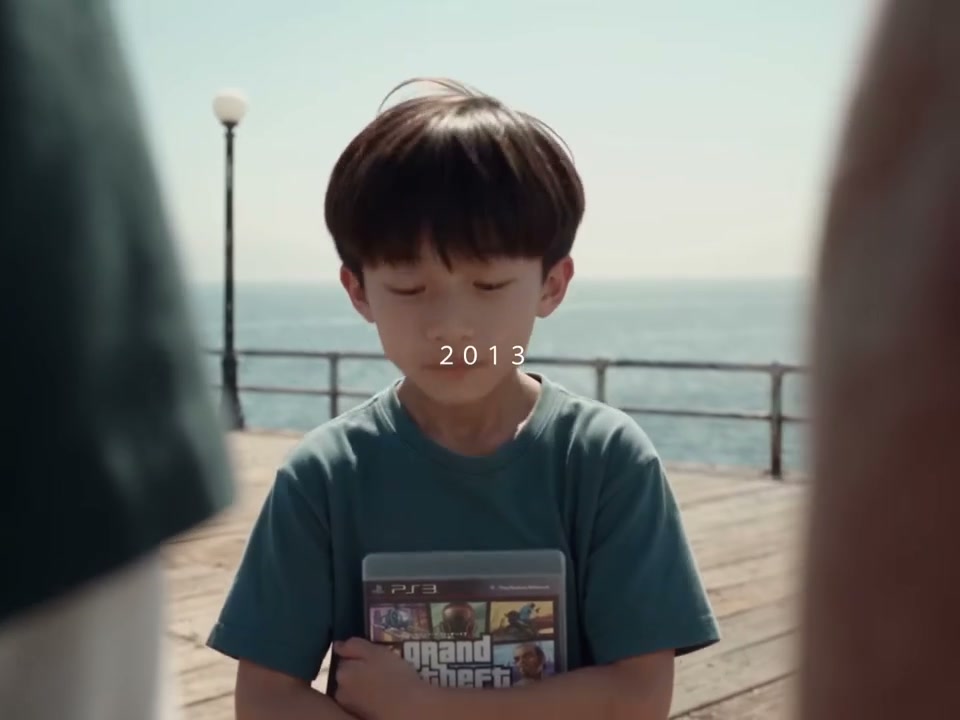
GTA 5 Thank You for 13 Years AI follows a traveler across two moments on the same pier. In the 2013 scene, a child meets three companions and holds a game case. In 2026, the traveler returns grown up for an emotional goodbye.
For GTA 5 Thank You for 13 Years AI, you add one current photo; the prepared video supplies the setting, supporting characters and camera cuts. We first create an imagined childhood reference from your photo, then use both images to guide the video. The child may look different from your real childhood photos.
This GTA 5 2013 vs 2026 AI scene is a personal time jump. The same traveler returns to familiar companions years later; the reference supplies the location, year labels and sequence of interactions. You choose the traveler and the version rather than writing a separate prompt for each scene.
GTA 5 Thank You for 13 Years AI is designed around one traveler, not a fully customizable cast. Your selected photo guides the person who appears in both chapters; the supporting people, pier and camera sequence come from the reference.
THREE SIMPLE STEPS
For GTA 5 Thank You for 13 Years AI, upload a clear current photo of the person you want to feature. A visible face, hair and clothing give the model cues for close-ups and wider pier shots.
Choose Economy, Standard or Original in GTA 5 Thank You for 13 Years AI. Each includes a 2013 meeting and a 2026 return; longer versions keep more of the original sequence.
Sign in and check the credits shown on Generate. When your GTA 5 Thank You for 13 Years AI video is ready, review both ages, the transitions and soundtrack before downloading it from My creations.
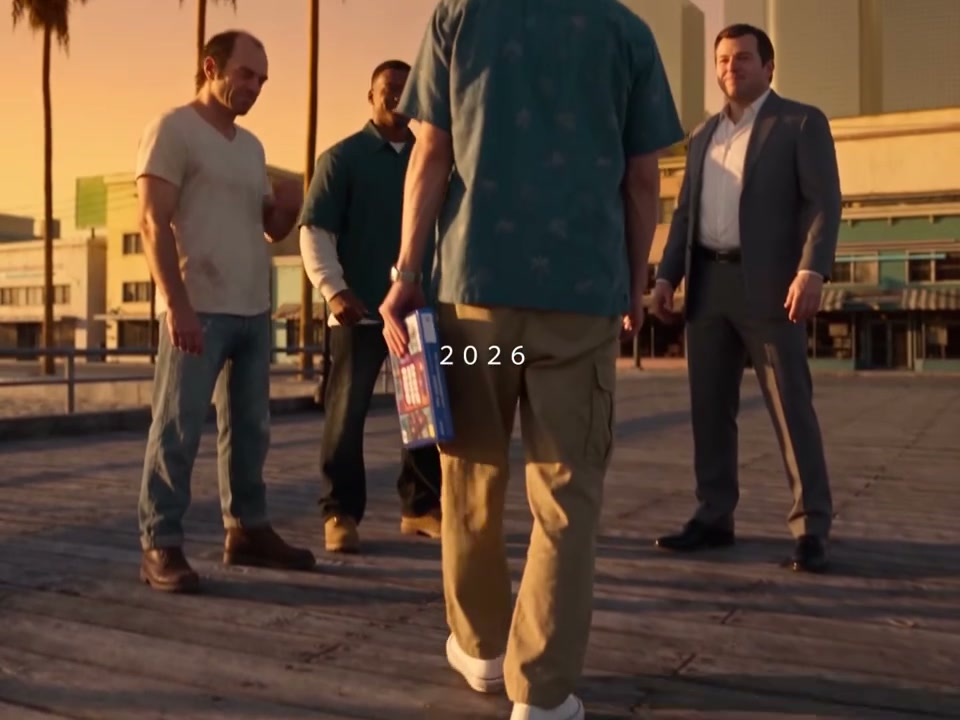
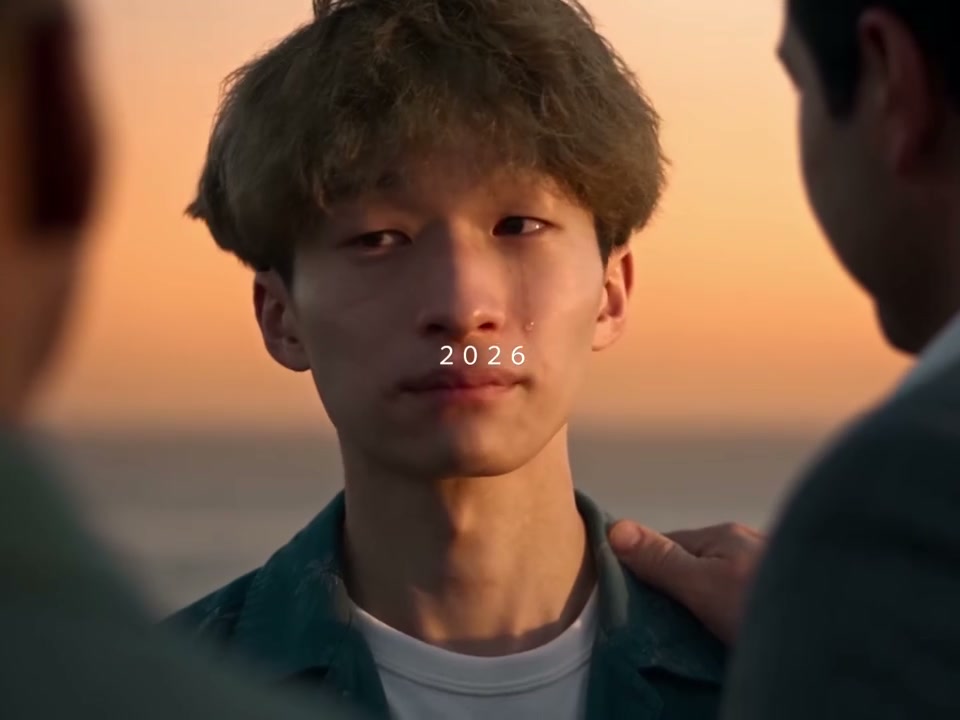
These images are stills from the GTA 5 Thank You for 13 Years AI reference video. The people and details in your result may look different.
In GTA 5 Thank You for 13 Years AI, the younger traveler approaches the three companions, holding a game case. Your photo guides the imagined childhood appearance, while the prepared footage keeps the pier and the original sequence of gestures.
The GTA 5 Thank You for 13 Years AI scene moves to 2026, with the traveler returning to the pier as an adult. The same uploaded photo guides both appearances, tying the chapters to one traveler. Facial and clothing details can still vary between shots.
The final close-up gives the farewell its personal moment. Check the face, hairstyle, clothes and hands across the cuts; AI can change details, even when the same photo is used for the two years.
CHOOSE YOUR TAKE
Every GTA 5 Thank You for 13 Years AI version uses Seedance 2.5 Edit at 480p and one traveler photo. Each has its own prepared reference and includes both years. The player above shows the reference for your selected mode, while your generated person and details can differ.
GTA 5 Thank You for 13 Years AI Economy is a compact selection of the child on the pier, a greeting, the adult return and the farewell close-up.
GTA 5 Thank You for 13 Years AI Standard gives more time to the first approach and the return in 2026, while keeping both chapters of the story.
GTA 5 Thank You for 13 Years AI Original follows almost the entire reference, including more reactions from the three companions.
PREPARE YOUR PHOTO
GTA 5 Thank You for 13 Years AI starts with one current photo. Choose an image where the traveler is easy to distinguish from the background and where the face is not covered by a hand, mask or strong shadow. A recognizable hairstyle and visible clothing can give the video model useful context for shots at the pier.
The childhood image in GTA 5 Thank You for 13 Years AI is an interpretation, not a reconstruction of a specific photograph. Details such as hair, clothing and facial features may differ between the imagined child and your real childhood. The adult scenes are guided by the original upload, and both stages can still introduce changes from one cut to the next.
Before submitting GTA 5 Thank You for 13 Years AI, compare the three reference previews and pick the amount of the story you want to keep. The preview shows the prepared footage, while My creations is where you can review the video made from your photo. Check the displayed credit cost before starting another attempt.
BEFORE YOU SHARE
A well-lit, unobstructed face helps the model interpret the traveler. A waist-up or full-body photo also provides clothing and body context for wider shots. A single-person image makes it clearer which face should guide both parts of your GTA 5 Thank You for 13 Years AI video.
GTA 5 Thank You for 13 Years AI makes a visual interpretation of a younger person. It does not know what you actually looked like in 2013, and it may change features between shots. If the result is hard to recognize, try a clearer photo and compare the close-ups before deciding whether to share it.
Watch the GTA 5 Thank You for 13 Years AI transition into 2026 and listen to the selected soundtrack. Confirm that you have the rights needed for your photo and for the way you plan to share the video. The model may also alter the small year labels, hands or game case, so review those details at the end of the generation.
QUESTIONS, ANSWERED
It is a fan-inspired 2013-to-2026 farewell video. A younger traveler meets three companions on a pier, then returns as an adult. One photo guides both versions of the traveler in the generated scenes.
No. Upload one clear current photo. We first create an imagined childhood reference from it and use both images to guide the video. The younger appearance may not match a real childhood photo.
Yes. Economy uses an approximately 12-second selection, Standard about 20 seconds, and Original about 30 seconds. Each prepared reference includes both years; the shorter versions use fewer shots.
The single photo slot is for the traveler. The three companions come from the prepared video and cannot be assigned separate photos on this page.
The result uses the soundtrack from the selected reference edit. Listen to the finished video and review the cut between the two years before sharing.
GTA 5 Thank You for 13 Years AI uses a prepared scene with fixed time periods, actions and supporting characters. You can choose a photo and a length, but this page does not offer an age slider or an editable script.
The GTA 5 Thank You for 13 Years AI reference contains both year labels and the model is asked to keep them. AI video editing can change text or small details, so check the labels in your finished video.
Economy uses 799 credits, Standard uses 1,299, and Original uses 1,599. The Generate button shows the applicable cost before you submit.
The input has one traveler slot, so a photo showing one clearly visible person gives the model a clearer subject. The reference supplies the three companions; you do not upload separate photos for them.
GTA 5 Thank You for 13 Years AI imagines a younger appearance from the current photo. It cannot know your actual childhood features. Review both ages in the finished video and choose a clearer input if you decide to make another attempt.
After signing in, check My creations for your generation and download the finished result there. The reference player above demonstrates the scene; it does not show your personal result.
No. This is an independent fan-inspired video tool and is not affiliated with or endorsed by Rockstar Games or the owners of Grand Theft Auto.
Compare one-time credit packages on the pricing page.
Bring your own photo into a GTA 5 Thank You for 13 Years AI farewell.
Create your video