
A GAME NIGHT TURNS APOCALYPTIC · FAN-INSPIRED VIDEO
GTA 6 Apocalypse AI Video
Create a GTA 6 Apocalypse AI video from one photo, with a player, a dramatic countdown and a wave outside.
THE SCENE
What is GTA 6 Apocalypse AI?
GTA 6 Apocalypse AI puts your chosen player in a fan-inspired end-of-the-world scene. Someone sits in front of a screen as a countdown builds and a falling object and wave appear outside. Upload one photo to guide the player while the prepared reference supplies the room, timing and changing view.
GTA 6 Apocalypse AI creates a video, not actual game footage or a game feature. The reference establishes the intended sequence, but AI can alter a face, screen, window, motion or background detail. The preview is the original reference rather than your finished result.

HOW TO CREATE
How to make a GTA 6 Apocalypse AI video
- Choose a clear photo of the person you want in the player’s seat. The image should show one identifiable subject; the room and outside event are already provided by the reference.
- Compare the GTA 6 Apocalypse AI previews. Economy starts later and emphasizes the falling object and wave; Original keeps the longer buildup and countdown.
- Sign in, confirm the displayed credit cost and generate the video. The page supplies the fixed prompt and reference; upload only the player photo.
- Review the result in My creations. Check the seated player, the screen and the transition to the view outside, then listen to the soundtrack before saving.
Put a player inside the GTA 6 Apocalypse AI countdown
The single image role in GTA 6 Apocalypse AI is the person sitting in front of the screen. The supplied photo guides that person’s face, hair and appearance. The monitor, room and view outside belong to the reference sequence; this page does not provide separate slots for changing the screen, scenery or falling object.
Because the player is seen in a particular seated position, a photo with a clear subject works better as a starting point than a crowded group picture. If clothing matters, use an image that shows it. A generated video can still change posture, hands and details that are not visible in the upload.

Choose between buildup and the dramatic moment
Original uses the approximately 19-second full reference, leaving more time for the countdown and room setup. Economy uses an approximately 15-second excerpt beginning later in the source. It keeps the falling object and wave while omitting much of the opening countdown.
Watch the selected GTA 6 Apocalypse AI preview before generating: the shorter clip is a genuine excerpt, so events outside that excerpt are not part of its reference. Economy costs 799 credits; Original costs 1,299 credits. Both use Seedance 2.5 Edit at 480p and attempt to restore the selected reference sound afterward.
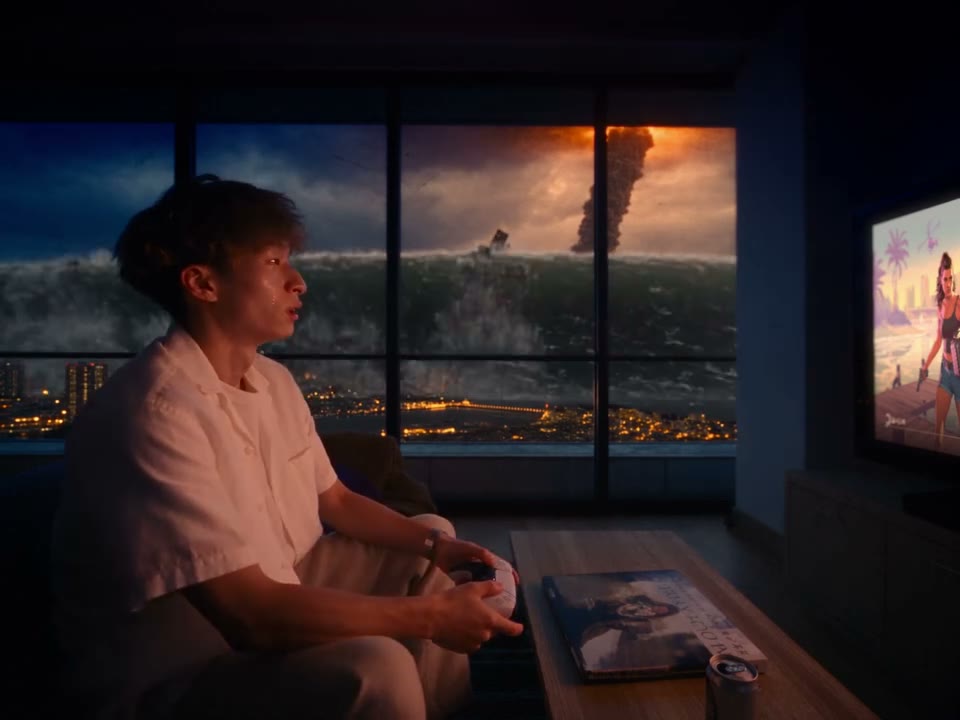
Review the GTA 6 Apocalypse AI screen, window and sound
The contrast between a familiar gaming setup and the scene outside is the point of GTA 6 Apocalypse AI. On playback, check whether the player stays recognizable when the view changes and whether the window, screen and background still make the story understandable. AI may alter displayed text or make objects move differently.
If restored, the soundtrack comes from the chosen reference rather than a new recorded performance. Check timing and volume in the completed file. Use an image you have permission to upload, and confirm the rights needed for the video and soundtrack wherever you intend to publish it.
Selecting a player for the room for GTA 6 Apocalypse AI
The person in GTA 6 Apocalypse AI is seated in front of a screen, so start with a photo of the individual you want in that position. Choose one subject with a visible face and hair, and avoid heavy shadows or a crowded frame. A picture showing the upper body can also give the model information about clothing.
A still photograph cannot supply every view shown by GTA 6 Apocalypse AI. The model follows the pose and camera in the reference while inferring details the photo does not reveal. The person may look different from one shot to another; check the finished result for recognition and continuity rather than expecting an exact portrait pasted into every frame.
How the scene builds for GTA 6 Apocalypse AI
The full reference begins inside a gaming room, then shifts attention to events beyond the window. GTA 6 Apocalypse AI uses that relationship between the seated player, screen and outside view to create a dramatic contrast. The player photo does not replace the meteor, wave, room or screen; those elements are guided by the reference.
The tool does not provide an editable screenplay, a second background image or a way to choose the exact disaster. Screen graphics and the outside event can be interpreted differently by the model. If a particular detail is essential to your story, use the preview to understand the intended action and then verify that detail on the generated result.
Choosing a buildup or a faster reveal for GTA 6 Apocalypse AI
Original follows the roughly 19-second full GTA 6 Apocalypse AI reference and retains more of the countdown. Economy begins around 3.9 seconds into the source and runs for roughly 15 seconds. The later excerpt emphasizes the falling object and wave while skipping much of the initial waiting. Both versions use the same player role.
Play both previews before deciding which part you want. The shorter version is not a promise of a different disaster or a faster model; it is a different section of the reference. Economy costs 799 credits and Original costs 1,299 credits. Verify the amount beside Generate after selecting your mode.
Checking the visual transition for GTA 6 Apocalypse AI
After GTA 6 Apocalypse AI finishes, follow the sequence from the player to the view outside. Check that the subject remains recognizable and that the location of the screen, window and room still reads clearly. The reference guides the shot order, but generated objects and gestures can move or change unexpectedly.
Text on a screen is a particularly fragile detail in AI video. Numbers, lettering and countdown graphics may not match the source. The same applies to the shape and timing of the wave or falling object. Watch the complete output rather than selecting a result solely because its thumbnail looks right.
Finishing your fan concept for GTA 6 Apocalypse AI
The selected GTA 6 Apocalypse AI reference supplies the soundtrack that may be restored after silent generation. Listen to the beginning, the transition and the ending to judge whether the sound fits the visual result. The source audio has not been transcribed here, so no particular spoken line is promised.
My creations holds the result for the account that started it. The page creates a fan-inspired video and does not establish anything about real game features or events. Use a photo you can share and check the rights for the image, soundtrack and resulting clip before publishing it elsewhere.
QUESTIONS, ANSWERED
GTA 6 Apocalypse AI FAQ
What is GTA 6 Apocalypse AI?
It is a fan-inspired video scene with a seated player and a dramatic event outside. One photo guides the player; a fixed reference supplies the room and sequence.
Is this official GTA 6 footage?
No. GTA 6 Apocalypse AI is an independent AI video tool. Its reference scene is not evidence of an official game feature, trailer or gameplay.
What photo does GTA 6 Apocalypse AI require?
One photo of the player is required. Use a clear picture with one recognizable subject; the page does not require a separate image of the room or wave.
What is different in GTA 6 Apocalypse AI Economy?
Economy begins later in the source and concentrates on the falling object and wave. Original keeps more of the approximately 19-second countdown and setup.
Can GTA 6 Apocalypse AI replace the scene outside?
No separate background upload is provided here. The falling object, wave and view outside are guided by the prepared reference and can vary in the generated result.
Will the GTA 6 Apocalypse AI countdown text be exact?
AI can alter on-screen writing and timing. Review your result and do not rely on the generated screen as an exact copy of the preview.
Does GTA 6 Apocalypse AI include sound?
The selected GTA 6 Apocalypse AI reference soundtrack may be restored after the silent generation step. Check the completed audio and timing before sharing.
How much does GTA 6 Apocalypse AI cost?
Economy uses 799 credits and Original uses 1,299 credits. The Generate button displays the selected cost.
Ready to make your GTA 6 Apocalypse AI video?
Choose your photo and preview the scene before you generate.
Create your video